

If you managed to pick up a camera (something other than your phone camera), chances are that there are a bunch of shooting modes. Maybe it’s a dial on top of your camera with a bunch of letters that make no sense. Or maybe it’s a setting in your camera menu. The camera’s manual may give you some insights. But manuals tend to fall short on why you might want to use those modes. Let’s start by going over some of these modes:
- Auto or A+
- A or Av – Aperture Priority
- S or Tv – Shutter Priority
- P – Program Mode
- M – Manual
Some cameras – particularly entry-level consumer cameras, may have additional modes, typically identified with cute pictures. For example, a macro mode (often an icon with a flower) is good for close-up shots. Or there may be a portrait mode (icon of a person), which is…well…for taking portraits. These modes are designed to make using the camera easier for those who simply wish to take the photo, with little care for the technicalities. But if you’re here reading this blog, you do care. So I am not going to get into the details of these modes. In the scope of this article, I’m going to focus on the modes outlined above.
As a preface before we proceed, I want to acknowledge that we may be getting ahead of things here. If you’re new to photography, I may be getting into some things that you’re not yet familiar with, like Aperture, or Shutter. So it may seem like this is out of place. However, I want to expose you to different shooting modes that you can experiment with as you are out and about on your photo walks. In future articles, we will circle back on all of the most relevant details In the meantime, I’ll do my best to explain the details that matter.
Auto Mode
This mode gives the camera ultimate control of your camera. This is the mode you probably used the first time you’ve used your camera, especially if you’re a beginner. This is also the mode that you can use if you don’t want to think about anything. The camera controls the size of the aperture (the opening that lets light into the camera), the shutter speed (how long it allows light to enter the camera), and the focus. The camera will try to allow as much as possible to be in focus at all times. So if you’re making memories, this may be a good no-thought mode. But it doesn’t give you very much control, and it doesn’t allow you to flex your creative muscles. In fact, the only thing you control in this mode is what you’re capturing, and your composition.
When you’re first starting out, I actually recommend auto mode a lot. As a beginner photographer, I feel it’s important to focus on subject and composition. You should be trying to figure out what to shoot, and how to frame it up in your shot. So while some may shun the pedestrian nature of this mode, I feel it’s still a great learning tool.
Aperture Priority
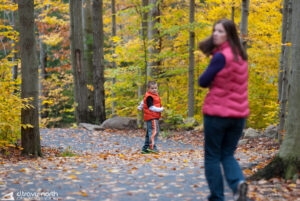
Aperture Priority allows you, the photographer, to control the size of the aperture, while the camera figures out shutter speed. This is critical if you’re shooting mostly still subjects, and you want to control the depth of field. In other words, if you want to control how much is in focus (or not in focus) in your image, Aperture Priority is the mode for you. This mode is a favorite of landscape, architecture, and still-life photographers. It’s also a critical mode for portrait photographers, though for many reasons – such as studio lights – many portrait photographers shoot in manual.
Aperture Priority is my absolute favorite mode when I am not using off-camera flash. I like to control the depth of field, and it’s part of my shooting style. Even though I am more than capable at shooting full manual, I tend to only do so when I’m locked down on a tripod, with plenty of time to plan out the shot. The photo here exhibits a tighter depth of field where my son is in full focus, but my wife is not. This is achieved by using aperture priority mode, and a wider aperture. PS – this is a very old photo of my wife and son – but my son is now college-aged.
Shutter Priority

Speed is the name of the game with Shutter Priority mode. The shutter is responsible for how fast the camera takes the photo. With a traditional SLR, your camera may have a physical shutter that slides across the sensor or film, exposing the photo in a time-measured burst. Some mirrorless cameras may handle this digitally, turning on the sensor for short bursts. Regardless, the amount of time it takes to capture the photo is the difference between freezing motion in time or motion blur. This is a mode favored by Sports Photographers. In Shutter Priority, you control the shutter speed, and the camera adapts the aperture to ensure your photo has enough light. Like other modes, it isn’t full-proof. If there isn’t enough light getting into your camera, the camera may give you warnings that your images might turn out. Too high of a shutter speed in low light conditions could result in highly underexposed images. This is why sports photographers often have very large lenses, to get as much light into their cameras as possible. They are expensive but worth it. I mention this because as an amateur, you should be aware of this limitation. But it can be overcome if you find yourself drawn to sports photography.
Program Mode
Program Mode allows you to set pre-determined tolerances for your aperture, shutter, and sometimes ISO. Some cameras could have 2 or 3 program modes that you can define for specific circumstances. Depending on your settings, this can be a very dynamic mode that gives you a little control but still allows you to capture photos mostly without much thought. While a camera may come pre-programmed, it may require some setup to get it exactly to your needs or desires. For some, this will easily replace Auto Mode for casual shooting. And I would highly recommend looking into that if you want to take advantage of such a feature.
If I’m being honest, this is a mode I rarely use. So I don’t claim to be an expert on this mode. I learned on a cheap film camera in the ’80s, well before program modes were mainstream. So I grew to favor either shutter priority or aperture priority modes well before I was afforded a camera that had a program mode. That’s not to say that you shouldn’t explore and use program modes. It’s a great mode for a large number of photographers. It’s just not a mode I’ll be speaking about much.
Manual Mode
Manual – or Full Manual – is a badge of honor to some. Using manual mode requires mastery of the exposure triangle. So it goes without saying that this may be the most difficult mode to shoot in. Unfortunately, it also has snob appeal: “I only shoot manual” might be the calling card of someone who likes to show off how much they know about photography. If you meet someone like that, smile and move on. The photography community is not about superiority. We’re a community about building everyone else up, thriving collectively. But I digress.
Manual mode is often critical if you’re shooting with off-camera flash, or if you want to dial in every minor aspect of the image. It is the mode where you can push the envelope of exposure – pushing your shot to overexpose or underexpose so that you get an effect that your camera might think is imperfect. Photography is an art, after all. And your camera is going to function on an algorithm in any semi-automatic mode. But if you want to break the rules, or if you want to intentionally break a photo, manual mode is for you. As for flash, there are a lot of camera systems out there that have fully automatic flash. Whether the flash is on or off camera, your camera can quickly calculate the best exposure for the shot and adjust your flash accordingly. Fully manual flash may seem scary, but in many cases, it can be beneficial. But that’s a topic for a different day. All you need to know right now is that manual mode gives you the utmost control to get really outside the box on your exposure, whether you’re using a flash or not. As an experienced photographer, I can tell you that most photographers shoot in modes other than manual.
Which Mode for You
If you’ve never picked up a camera, as I noted earlier, I think you should be using Auto mode for now. If you want to push the envelope just a little bit, try experimenting with Aperture Priority and some still or slow-moving subjects. Many of you will grow to love aperture priority. But if you’re really into capturing fast things like moving cars, athletes, or animals, you should experiment with Shutter Priority as much as possible. Program Mode is for the tinkerers who want more control, but don’t want a simpler in-the-moment experience. As for Manual…if you’re new to photography, let’s save that one for a different time.
Regardless of which mode you choose, the key is to have fun and capture freely. If you get frustrated, there’s nothing wrong with switching back to an automatic mode for a while. But please try to push the envelope and get outside your comfort zone just a little bit every time you take a photo walk. It’s good practice, and I promise that you will learn and grow.
Capture Well.
